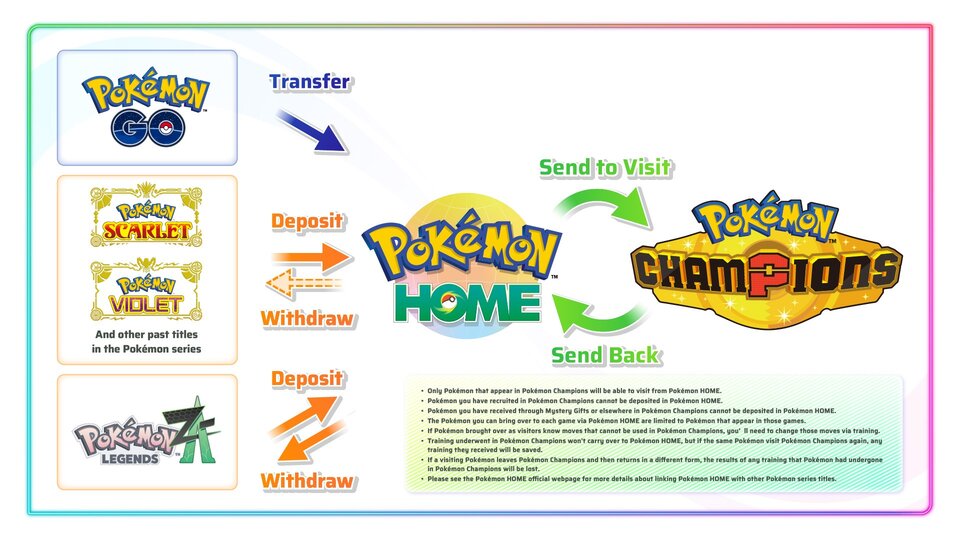
Pokémon HOME is the official cloud service that lets players store, organize, and transfer Pokémon across compatible Nintendo Switch games and the mobile version of the app. While transferring Pokémon is straightforward once everything is set up, there are important compatibility rules, limitations, and requirements that determine where each Pokémon can go.
This guide explains how Pokémon HOME transfers work, which games are supported, how to move Pokémon step by step, and what restrictions players should know before transferring.
What is Pokémon HOME?
Pokémon HOME is an official cloud-based Pokémon storage service developed for Nintendo Switch and mobile devices. It allows players to collect Pokémon from multiple compatible games, organize them in one place, complete the National Pokédex, and transfer eligible Pokémon between supported titles.
The Nintendo Switch version is used for transferring Pokémon between games, while the mobile version includes additional features such as trading and Pokédex management.
Which games work with Pokémon HOME?
Pokémon HOME currently supports transfers with these Nintendo Switch titles:
- Pokémon Scarlet
- Pokémon Violet
- Pokémon Legends: Arceus
- Pokémon Brilliant Diamond
- Pokémon Shining Pearl
- Pokémon Sword
- Pokémon Shield
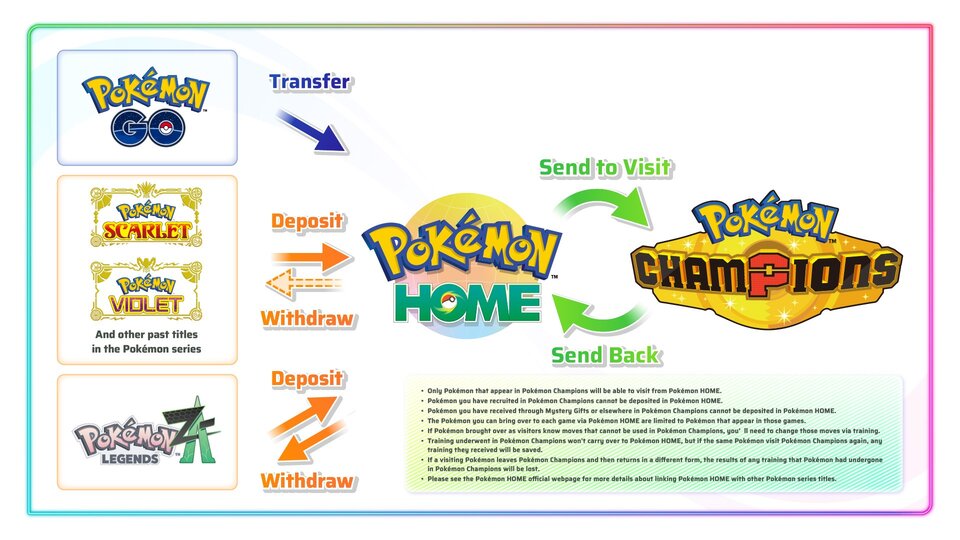
Pokémon HOME also connects with Pokémon GO. Pokémon transferred from Pokémon GO first arrive in Pokémon HOME before they can be moved into compatible Nintendo Switch games if they meet game-specific requirements.
How to transfer Pokémon between games
Follow these steps to move Pokémon using the Nintendo Switch version of Pokémon HOME.
Step 1: Install Pokémon HOME
Download Pokémon HOME from Nintendo eShop and sign in using the same Nintendo Account linked to your compatible Pokémon games.
Step 2: Select Pokémon
Open Pokémon HOME on Nintendo Switch and choose “Pokémon.”
Select the game you want to access. HOME will display your game’s storage boxes alongside your HOME storage boxes.
Step 3: Move Pokémon
Drag or move eligible Pokémon between the game’s boxes and Pokémon HOME.
Save your changes before exiting.
Step 4: Transfer into another compatible game
Open Pokémon HOME again, select the destination game, and move eligible Pokémon from HOME into that game’s storage boxes.
Save your changes to complete the transfer.
Why can’t some Pokémon be transferred?
Not every Pokémon can enter every game.
A Pokémon must be programmed into the destination game’s available Pokédex and supported data. Even if a Pokémon is stored in Pokémon HOME, it cannot be transferred into a game that does not support that species or form.
Some special forms and battle-only transformations also cannot be stored or transferred in their transformed states.
Can Pokémon return to previous games?
It depends on the games involved.
Pokémon can generally move between Pokémon HOME and compatible Nintendo Switch games as long as they remain eligible for each title.
However, Pokémon transferred from earlier games into newer generations may not always be able to return to previous titles if game compatibility or data formats prevent it.
Pokémon transferred from Pokémon GO into Pokémon HOME also have additional transfer restrictions defined by the official transfer system.
Pokémon HOME transfer requirements
Before transferring Pokémon, make sure you have:
A Nintendo Account linked to Pokémon HOME.
Compatible Pokémon games.
Save data for each supported game on the same Nintendo Switch profile.
The latest version of Pokémon HOME and each compatible game.
Some Pokémon HOME features also require an internet connection.
Pokémon HOME transfer tips
Plan your transfers before moving rare Pokémon, especially event Pokémon and Pokémon from Pokémon GO.
Keep important Pokémon in Pokémon HOME if you regularly play multiple compatible games.
Check whether a Pokémon appears in the destination game’s supported Pokédex before attempting a transfer.
Save changes before closing Pokémon HOME to avoid losing box organization.
Frequently asked questions
Is Pokémon HOME free?
Pokémon HOME includes both a free Basic Plan and a paid Premium Plan. Storage capacity and certain features differ between the plans.
Can I transfer Pokémon from Pokémon GO directly into Pokémon Scarlet or Pokémon Violet?
No. Pokémon from Pokémon GO must first be transferred into Pokémon HOME before eligible Pokémon can be moved into compatible Nintendo Switch games.
Do held items transfer through Pokémon HOME?
No. Pokémon cannot store held items in Pokémon HOME. Items remain in the original game.
Can every Pokémon be used in every Nintendo Switch Pokémon game?
No. Each game has its own list of supported Pokémon, forms, and mechanics.
Does Pokémon HOME delete Pokémon during transfers?
Transfers are designed to move Pokémon safely between compatible games. Always save your changes before exiting Pokémon HOME to ensure transfers are completed properly.
Source:Pokémon